
Introduction
Konnichiwa! Welcome to the AI Automation Dojo, the only place where we look at a messy corporate process and say, ‘Have you tried turning it off and… never turning it back on again?’
Today, we’re talking about why your automation pipeline is currently a pipe-clog of garbage, and how you can turn it into a pipeline of gold nuggets. We’re going to teach you how to stop “mincing the usual suspects” and actually find processes worth fixing.
I’m your host, Andrzej Kinastowski, one of the founders of Office Samurai – the company that treats business consulting like a martial art and treats corporate bullshit like a straw mat waiting to be cut..
So, whether you’re ready to build a multi-year roadmap or you just need a win by next Tuesday, you’re in the right place.
Now grab your favorite katana – or just the will to live through another “Reply All” thread – and let’s get to it!
Chapter 1: The “Bar Talk” Reality Check
Imagine you’re at a bar with a friend who is the Head of Automation in a big enterprise. You can be 100% sure that after a few beers they will go: “Oh, our processes are a mess, there’s nothing to automate, everything is a special case, there is no scale, we don’t even know where to look anymore”.
That is exactly where today’s topic comes in. The goal is for you to have a list of candidates that actually belong in the 21st century. And we won’t just be looking for “things to automate”, we’ll be looking for “things worth fixing”.
Most companies (and a lot of big consulting) make a classic mistake when they want to find automation ideas. They send out an email with an Excel attachment to every manager saying: “Fill in your ideas for automation”..
We call this the “Excel Trap”. Why? Because if people don’t know what makes a good process for automation, they’ll give you ideas that are either impossible to build or have zero ROI. If there is no external beholder – human or digital, you end up mincing the same usual suspects you have been talking about for the last decade. You end up with a pipeline full of garbage. And you need to remember – garbage clogs the pipelines.
At Office Samurai, we do things differently. When we work with a client, we usually take one of three paths depending on how fast they need to move and how deep they want to go.
Chapter 2: Path A – The “Long Blade” – Process Discovery (PD)
The first approach, Process Discovery (or PD), let’s call it the “Long Blade”. In the Office Samurai Dojo, this is our Katana. It’s long, it’s sharp, and it’s designed for when you need to clear a wide path through the jungle of corporate complexity.
When we talk about Process Discovery, we aren’t talking about a quick chat over coffee. This is a deep-dive mission that usually lasts anywhere from three to five weeks. It’s for the companies that are serious about building a multi-year automation roadmap and want to make sure they aren’t building on a foundation of sand.
The “Step Before the Step”: High-Level Analysis
Before we even think about sitting down with a single employee to watch them work, we start with what we call the High-Level Analysis. This is the step that a lot of consultants skip, and it’s exactly why they fall into the “Excel Trap” I mentioned earlier.
Our first move isn’t to ask for automation ideas; it’s to ask for the Organizational Chart. We sit down with the leadership and look at the structure of the company. Why? Because we want to see where the people are. If you have a department with 50 people in Customer Operations and only 3 people in HR, it doesn’t matter how much the HR manager wants a bot – the “gold” is likely in Operations.
By looking at the org chart first, we identify the “most suspicious” areas – departments where high headcounts often hide repetitive, manual work. We might find 20 people in Marketing doing data entry that no one realized was happening. This high-level view allows us to maximize our efforts and focus only on the regions of your company where automation will actually move the needle.
Educating the “Meatware”
Once we know which departments to target, we don’t just start interviewing. We start by educating. We begin with an “Intro” session to teach the team what a “good” automation candidate looks like.
We explain the criteria: Is it rule-based? Is it high volume? Is the data digital? We do this because we want the employees to understand the context of our questions. When they understand the “why,” they stop giving us “garbage” ideas and start pointing us toward the real bottlenecks they face every day.
The “Shadowing” – seeing the reality, not the myth
After we’ve narrowed down the departments and educated the team, then we go into the trenches for the shadowing phase.
One of the biggest mistakes most companies make is believing their own documentation. You know the ones – the “Standard Operating Procedures” that haven’t been updated since the Windows 7 era. In a Full PD, we don’t just read the SOPs; we sit down with the experts and watch them work.
We call this a Level 4 Analysis. We aren’t looking at every single tiny exception yet – that’s for the build phase – but we are looking deep enough to see which applications they use, how many steps are involved, and how complex the logic really is.
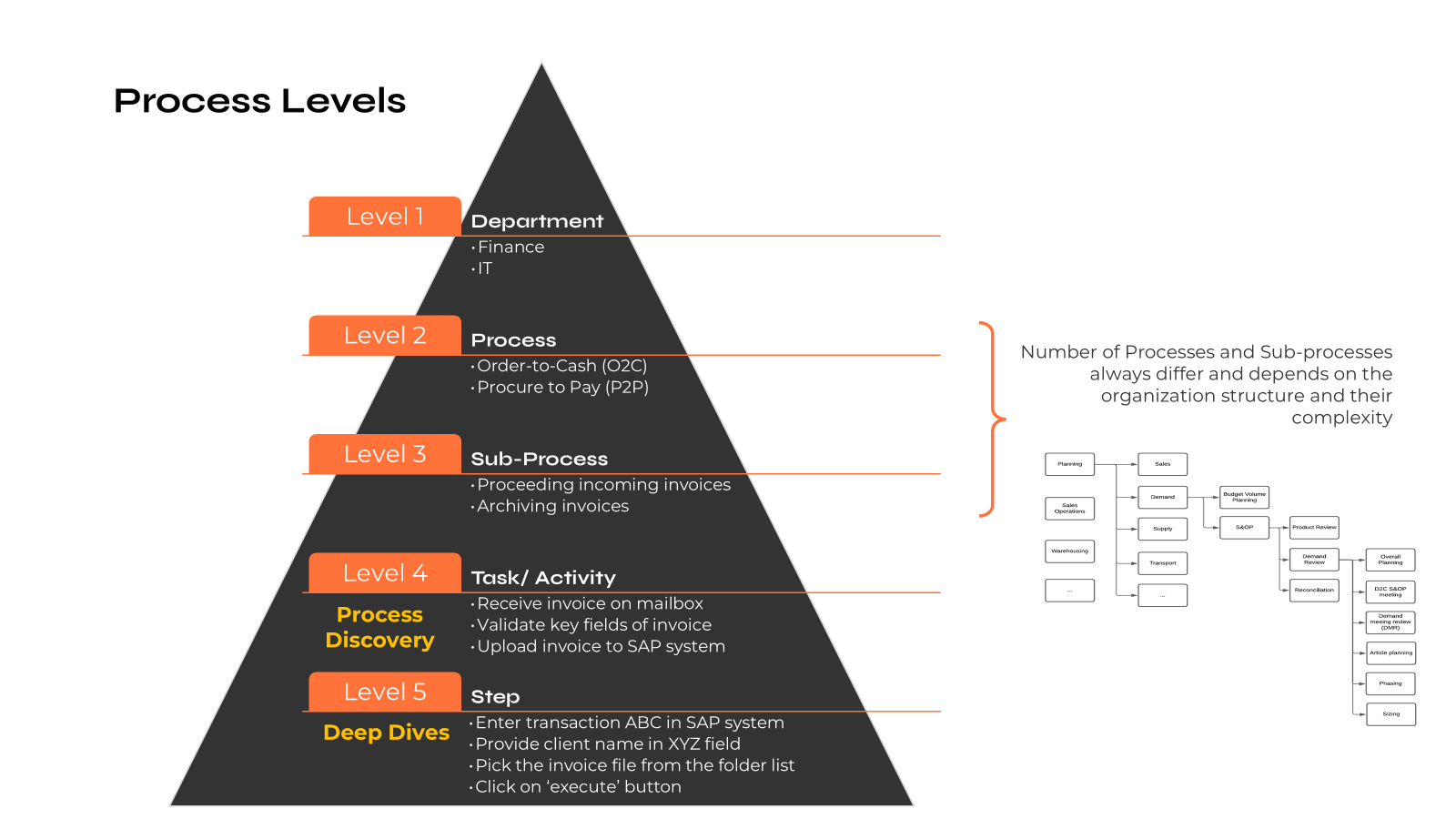
Our brains are terrible at remembering details and estimating averages. In a Full PD, we use our “Katana” to cut through those perceptions and find the hard data. We see the clicks, the copy-pasting, the Alt-Tabbing, and the “human middleware” moments that are invisible to the higher-ups.
The “why” before the “how”
One of the core philosophies at Office Samurai is that we don’t just automate for the sake of automation. A successful PD often results in us telling the client: “Don’t automate this”.
That might sound like bad business for an automation company, right? But it’s actually the highest value we provide. During a Full PD, we look at a process and ask: “Does this even need to exist?” Sometimes, a process is so broken that automating it would be like putting a jet engine on a horse-drawn carriage. You’ll just get to the wrong destination faster. We look for “Quick Wins” that aren’t even technical – maybe it’s just changing a PDF form to a digital one, or tweaking a step in the workflow.
So by the time we finish the discovery, we provide a list of recommendations that categorized processes into:
- RPA Candidates: Stable, rule-based, high volume.
- AI or Agentic Candidates: Processes requiring “judgment” or unstructured data (like those messy emails we talked about in past episodes).
- Process Optimization: Things you should just fix or delete.
- No-Go Zone: Things that are too unstable or have zero ROI.
The ROI of Sanity
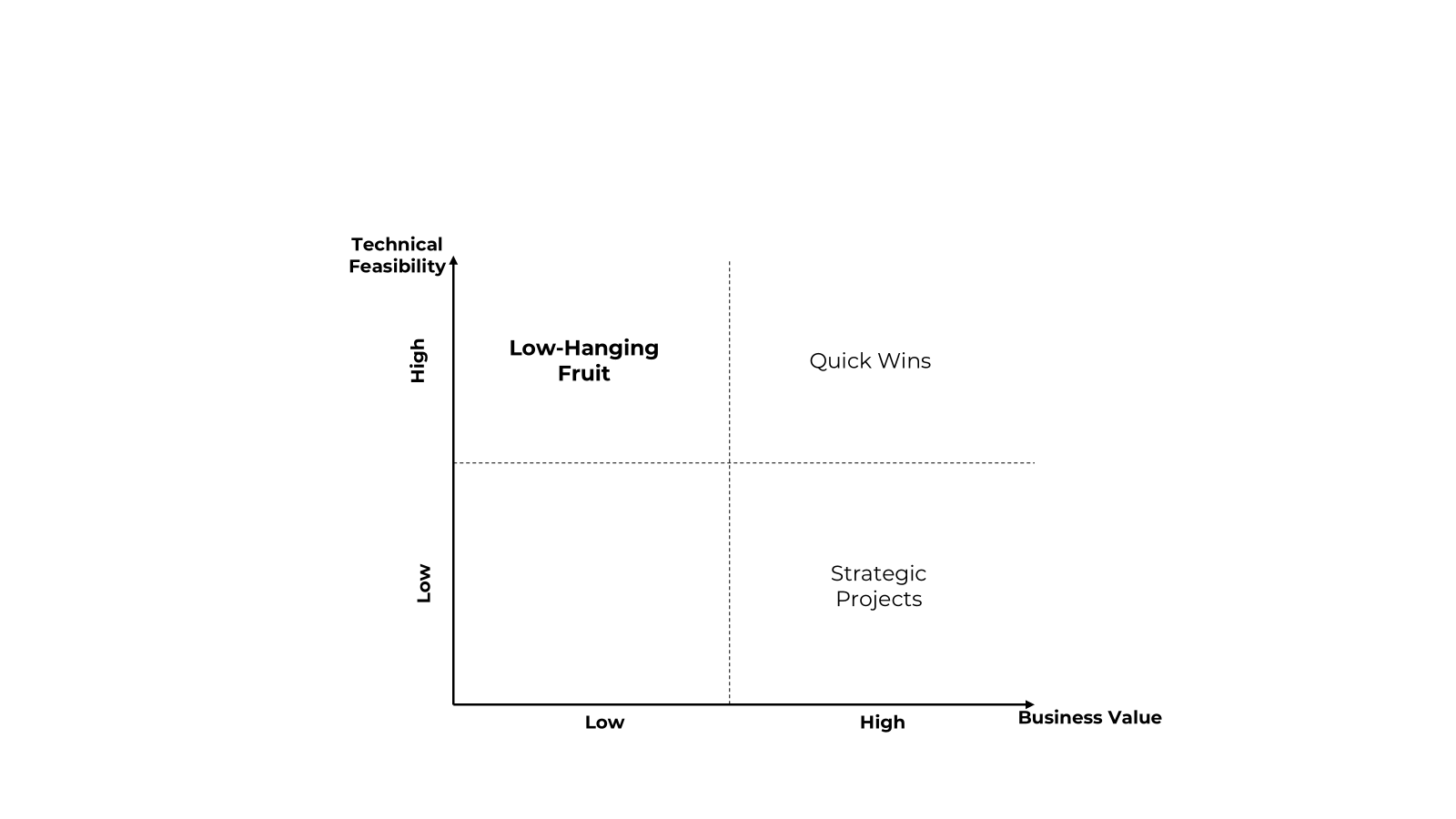
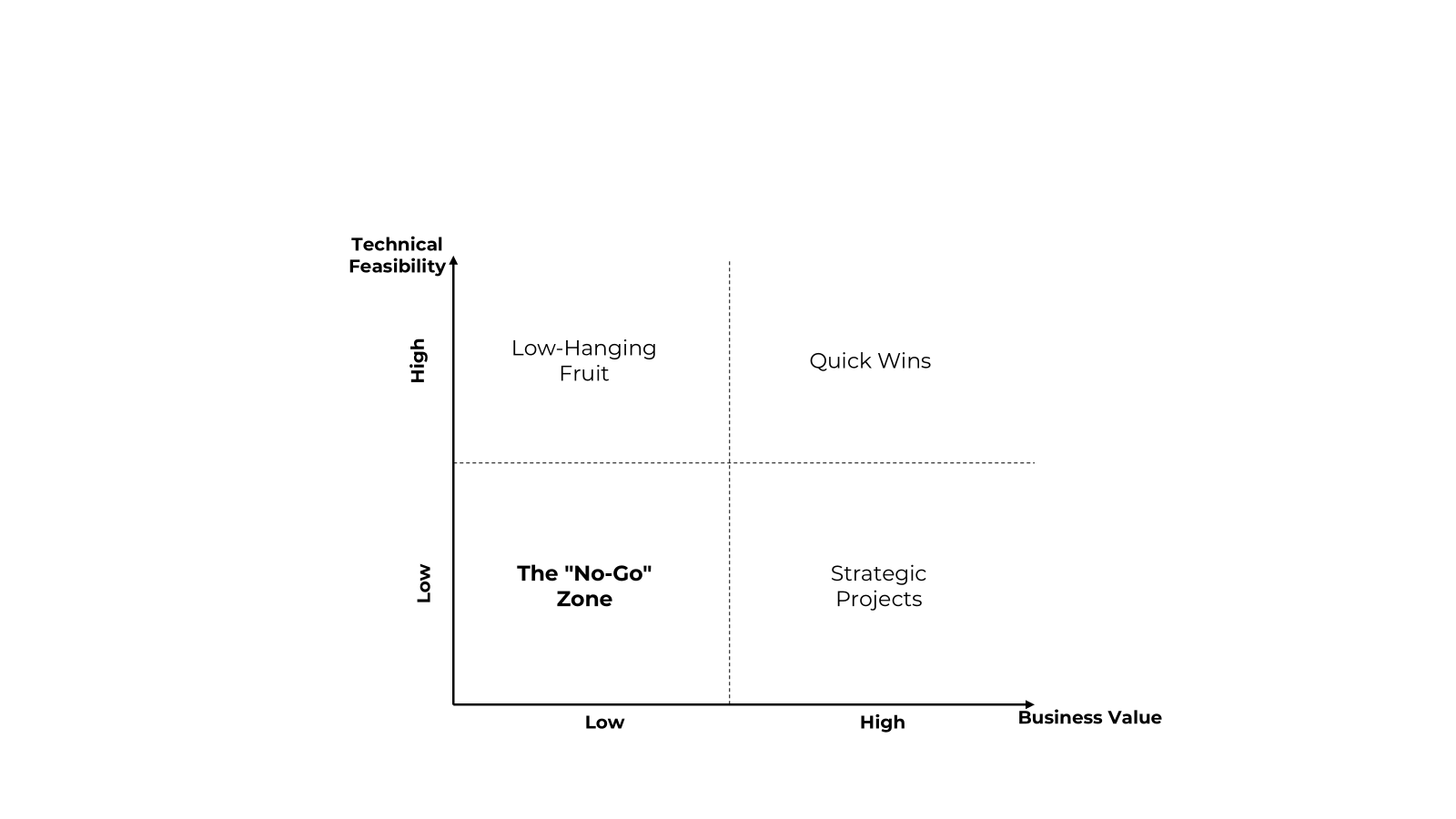
The output of a Full PD is what we call the Automation Pipeline. But it’s not just a list; it’s a prioritized strategic weapon. When we finish analyzing those “Level 4” details, we don’t just dump fifty ideas on your desk. We map them out onto a matrix that measures two things: Business Value and Technical Feasibility.
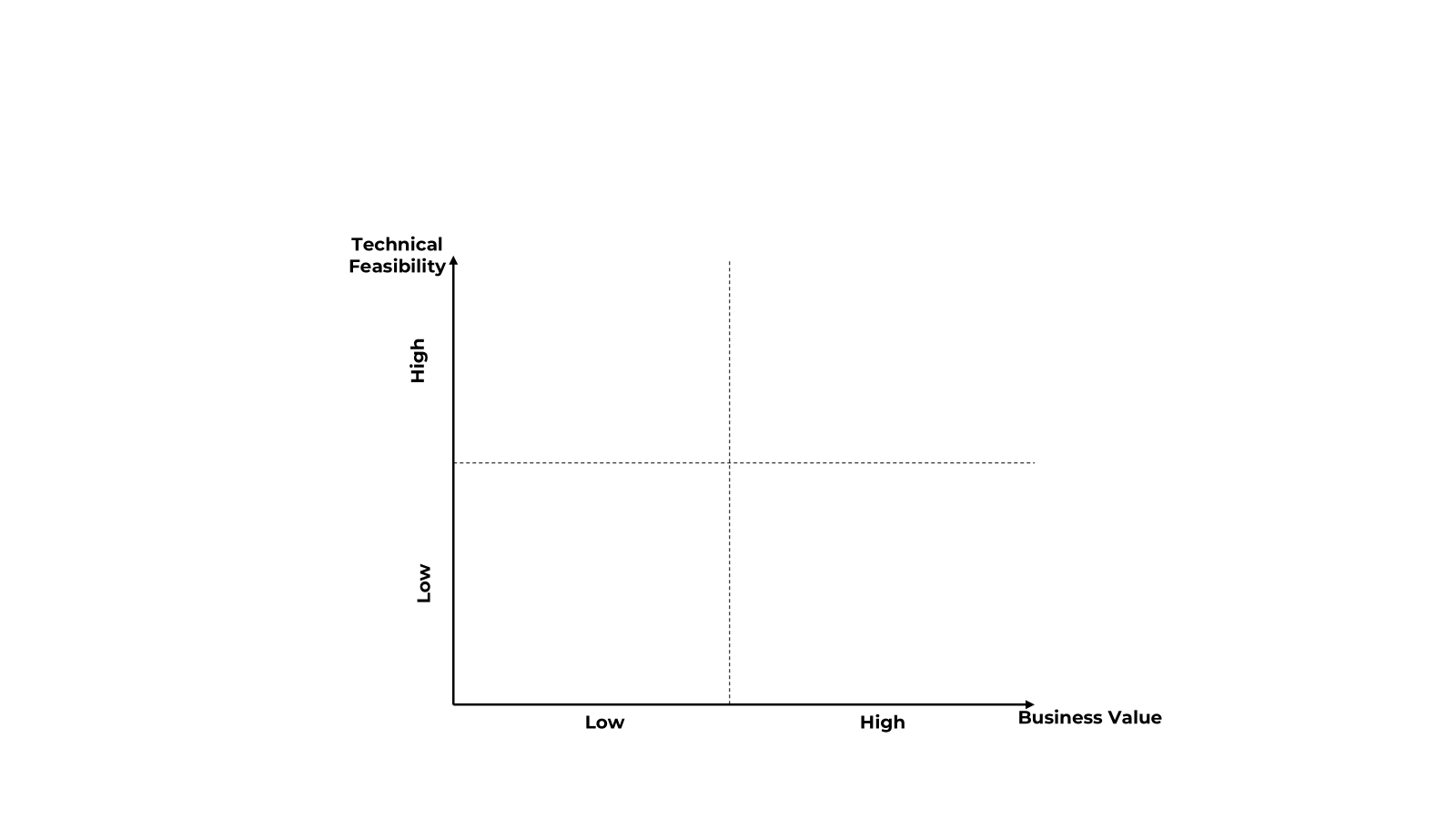
We split everything we find into four distinct categories. This is how we bring sanity to the ROI calculation:
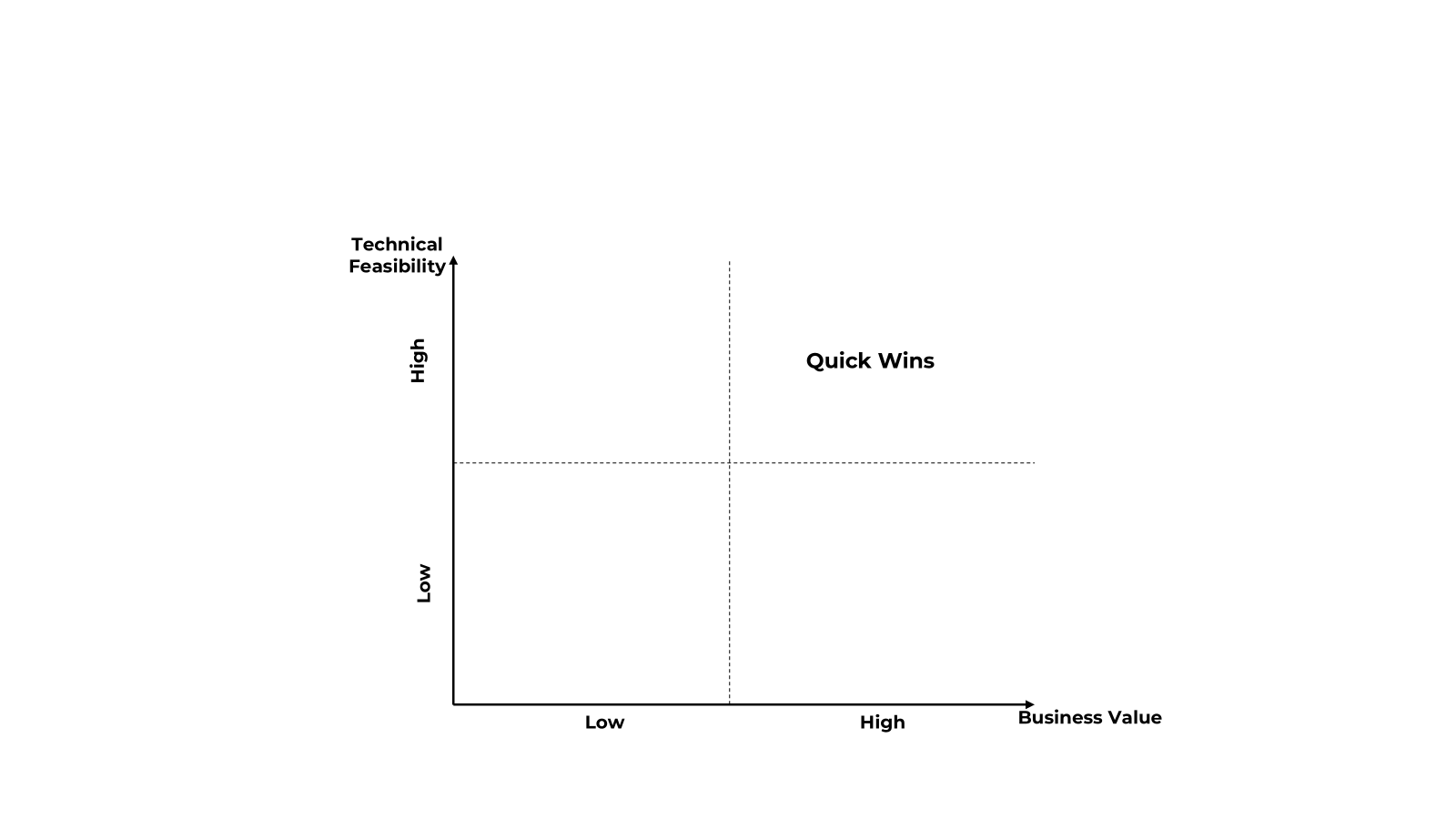
Quick Wins (High Value, High Feasibility):
These are the “no-brainers”. They are stable, high-volume, and easy to build. If we see a process where 10 people are just moving data between two spreadsheets every day, that’s probably a Quick Win.
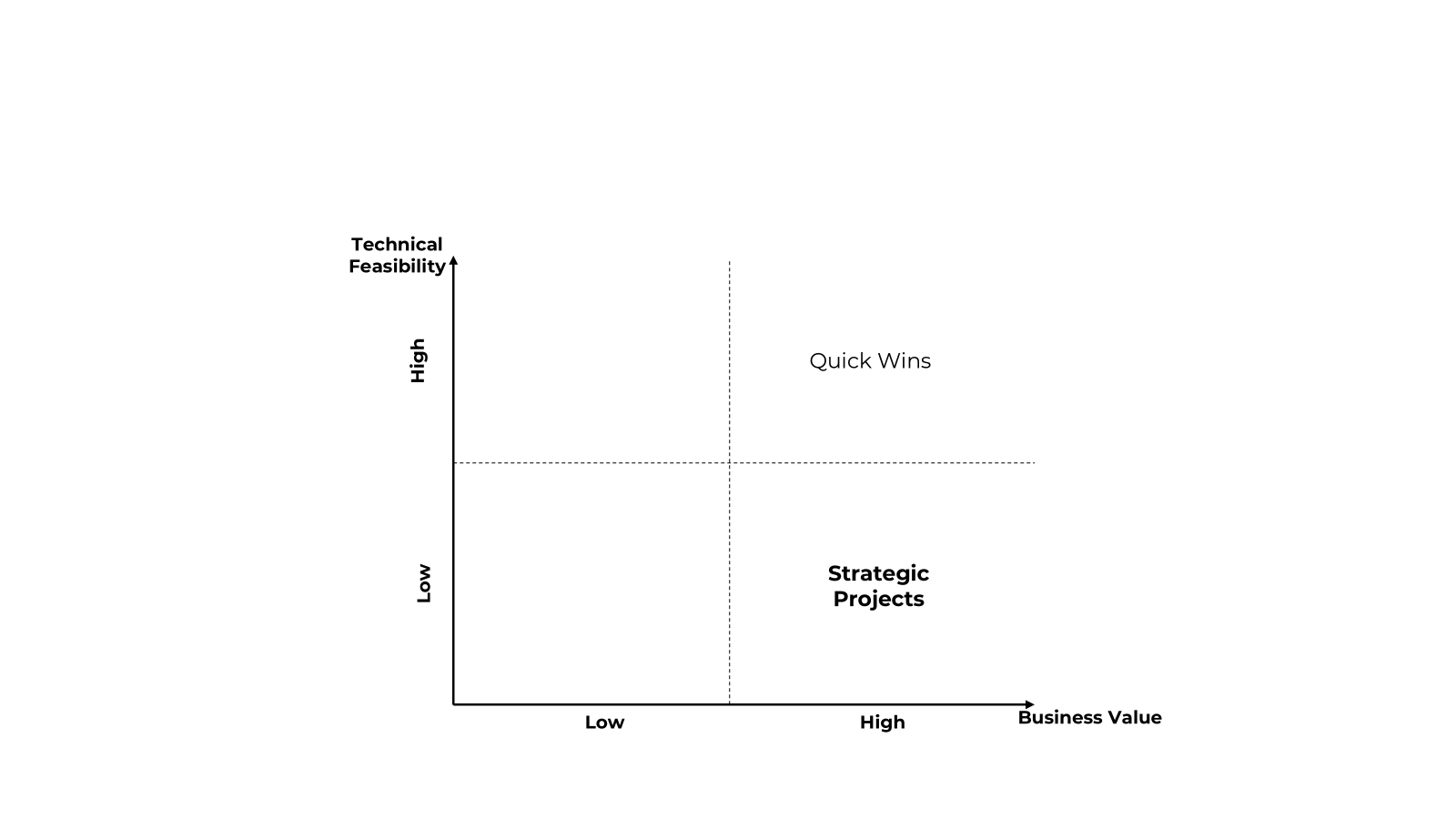
Strategic Projects (High Value, Low Feasibility):
These are the big ones. They might require GenAI, complex integrations, or custom agents. They take longer to build, but the payoff is massive – these are the projects that fundamentally change how a department operates.
Low-Hanging Fruit (Low Value, High Feasibility):
These are easy to automate, but the “juice isn’t worth the squeeze” right now. We put these in the backlog or relay them to Citizen Developers. They’re good to have, but they won’t save your quarterly budget.
The “No-Go” Zone (Low Value, Low Feasibility):
This is where processes go to die. If a process is unstable, changes every week, or has very low volume, we tell you straight up: “Don’t touch this”.
The Office Samurai “Order of Operations”
Most companies make the mistake of jumping straight into the “cool” AI stuff. We advise a very specific order of attack to ensure you don’t waste money.

Process Optimization
Before we write a single line of code, we look at the Process Optimization category. A successful PD often results in us telling the client to just change their workflow. If we find a step that is redundant, we don’t automate it – we delete it. Automating waste is just “faster waste”. We fix the “broken” parts of the process first so the automation sits on a solid foundation.

Quick Wins
We go for the RPA candidates that offer immediate relief. Why? Because you need to show everyone that this works. Quick Wins build trust and, more importantly, they “fund” the more expensive, complex projects. They prove that the people can actually work alongside digital coworkers.

Strategic projects, AI & Agents
Once the “plumbing” is fixed and the easy wins are running, we bring out the heavy machinery. This is where we get to more complex automations, and start deploying the AI elements – the ones that can handle messy data and make “judgement calls”.

The Trash Can
We explicitly tell you what to ignore. In our experience, knowing what not to do is just as valuable as knowing what to do. It prevents “pipeline clog” and keeps your development team focused on things that actually move the needle.
Process Discovery summary
The benefit of the Full PD is certainty. When you eventually go to your CFO to ask for the budget, you aren’t guessing. You have the data, the screenshots, the categorized matrix, and a clear “Why”. You aren’t just buying a bot; you’re buying a roadmap for sanity.
So, the Full Process Discovery is for you if:
- You have a large department and you know there’s “waste” but can’t pin it down.
- You’ve tried automation before and it failed or run dry
- You want a roadmap for the next 12 to 18 months, not just a one-off bot.
It’s about taking the time to sharpen the blade so that when you finally strike, you cut clean through the problem.
But, I know what some of you are thinking. “Andrzej, I don’t have weeks. I have a workshop scheduled for next Tuesday and I need a win now”. Well, for that, you don’t need the Long Blade. You need something shorter, faster, and more surgical. You need the “Short Blade”.
Chapter 3: Path B – The “Short Blade” – Quick Process Discovery (Quick PD)
So, we’ve talked about the “Long Blade” – that few weeks Katana of a project that maps out your entire organizational future. But let’s be real: sometimes you don’t have few weeks. Sometimes, you’re in a situation where the leadership is breathing down your neck, saying, “We keep hearing about AI and RPA, but we haven’t seen a single bot in our department yet. Show me something by next month or the budget goes to the Marketing team’s new brand refresh”.
In the Office Samurai Dojo, this is when we draw the Short Blade. Think of it like a Wakizashi or a Tanto – it’s surgical, it’s fast, and it’s designed for close-quarters combat. This is what we call Quick Process Discovery (or Quick PD).
If the Full PD is a marathon, the Quick PD is a two-day sprint. It’s not about finding every single hidden process in the jungle; it’s about identifying the biggest, most obvious targets so you can start building immediately.
The Anatomy of the 2-Day Sprint
A Quick PD usually takes the form of a high-intensity, two-day workshop. But don’t mistake “quick” for “shallow”. We still follow our core philosophy of avoiding the “Excel Trap”. We don’t just send a form; we get in the room with the people who actually do the work and their managers.
Day 1: The “Meatware” Upgrade We start exactly like we do in the Full PD – with education. We can’t just walk in and ask, “What should we automate?”. If we do that, people will either give us their most complex, nightmare-inducing tasks that no bot could ever solve, or they’ll stay quiet because they’re afraid a robot is coming for their job.
So, we spend the first few hours of Day 1 training them. We teach the team the “Samurai Criteria”:
- Is it rule-based? (Does it follow a logic a “digital intern” could understand?)
- Is it high volume? (Do you do it once a month or fifty times a day?)
- Is the data digital and structured? (Are we moving data between screens or squinting at handwritten faxes?).
Once the team understands the context, the energy in the room changes. They stop seeing us as “the efficiency police” and start seeing us as the people who are going to take away the boring, soul-crushing parts of their Tuesday afternoons. By the end of Day 1, we usually have a “Wall of Suspects” – a long list of processes that the team thinks are good candidates.
Day 2: The Slicing and Dicing This is where the “Short Blade” really earns its name. We take that long list of “suspects” and start cutting. We sit down with the Subject Matter Experts for “micro-interviews”. We don’t do a Level 4 deep dive here; we do what we call a Level 2 Analysis.
We’re looking for “deal-breakers”. Maybe a process looks great on paper, but then the SME mentions, “Oh, and every third transaction, I have to call a guy in the warehouse to ask him what he thinks”. Boom – that process is no longer a “Quick Win”. We move it to the “Strategic” pile or the trash can and move on.
By the end of those two days, you don’t just have a “feeling” about what to do. You have a Discovery Report that lists the top 5 to 10 candidates, prioritized by how easy they are to build and how much they’ll actually save you.
The “Inter-Team” magic: catching the seams
One of the coolest things about the Quick PD is what happens when you bring 2 or 3 neighboring teams into the same workshop.
In big corporations, departments often act like islands. Team A does their part and throws the “digital folder” over the wall to Team B. Often, the biggest inefficiencies aren’t inside the team; they are at the “seams” – the handoffs between teams.
During a Quick PD workshop, we’ll often hear Team A say, “We spend three hours a day formatting this Excel sheet before we send it to Team B”. And Team B immediately pipes up and says, “Wait, why? We don’t even use those columns! We just copy the first three and delete the rest”.
When you get these teams in the room together, you don’t just find automation candidates; you find “Process Optimization” wins that can be solved with a simple email or a change in workflow before a single line of code is ever written. We call this “cleaning the blade” before you strike.
Why the “Short Blade” is a Cultural Game-Changer
The benefit of the Quick PD isn’t just the pipeline; it’s the momentum. A 5-week project can feel like a “consulting event” that happens to a department. A 2-day workshop feels like a collaborative win. People walk away feeling heard, and more importantly, they walk away with a “discovery mindset”.
Once employees understand the criteria, they don’t stop looking for candidates when the workshop ends. They start sending emails a week later saying, “Hey, I just realized this other thing I do is also rule-based and high volume. Can we add it to the list?”. You aren’t just finding processes; you’re building a culture of automation from the ground up.
Is the Short Blade for you?
You should reach for the Quick Process Discovery if:
- You need a “Proof of Concept” (PoC) fast. You need to show the higher-ups that automation works in their specific department within a few weeks.
- Your pipeline is dry, but your budget is tight. You can’t commit to a long deep dive, but you know there’s “low-hanging fruit” waiting to be picked.
- You want to kickstart an “Automation Culture”. You want your team to start thinking like Samurais – constantly looking for ways to cut out waste.
The only downside? The “Bar Talk” effect. Because we aren’t “shadowing” for weeks, we are relying on what people tell us. And as we know, people are often “optimistic” about how long a process takes or how “standard” it really is. A Quick PD gives you a list of high-potential suspects, but they might still need a quick “sanity check” before you start building.
But what if you don’t even know which department to start with? What if you want to find the “truth” without having to sit in a workshop for two days? What if you want to see exactly what people are doing on their computers without them having to tell you a single word?
For that, we put away the manual blades and turn on the “Digital Sensors”. Let’s talk about Path C: Process intelligence.
Chapter 4: Path C – The “Tech Sensor” – KYP (Process intelligence)
If the Long Blade is a deep-dive mission and the Short Blade is a surgical strike, KYP is like a high-tech radar system. We’ve talked about this technology in previous episodes, so I won’t go into the weeds of how it works (and we will link episodes focused on KYP in the description), but in the context of building an automation pipeline, it is the ultimate “Bullshit Detector”.
Our brains are actually quite bad at remembering complexity, estimating what we do, and how much time we spend on tasks. KYP cuts through the corporate “fairytale stories” and shows us the messy, chaotic reality of a Tuesday afternoon. It’s a piece of software – an “agent” or “scout” – that records interactions like clicks and app usage. It doesn’t judge; it just gathers data.
It takes those hallway whispers – “Our CRM is a nightmare” or “We spend all day copy-pasting” – and turns them into a megaphone. It validates the struggles of our people with hard data. It proves that a problem isn’t just an annoyance; it’s a drain that might be costing the company 1,000 hours a month. It turns a gut feeling into a data-driven argument that’s impossible for a CFO to ignore.
You should reach for KYP if:
- You have a massive department: You can’t interview everyone, and you don’t want to guess who has the best automation candidates. KYP scans everyone simultaneously.
- You suspect the “Official Version” of the process is a myth: If you think your SOPs are out of date and people are using “shadow” workarounds, KYP will show you the real paths they take.
- You need “CFO-Proof” Data: If you need to prove the ROI of a multi-million dollar transformation, you don’t want to base it on “estimates”. You want to base it on millions of data points.
- Your pipeline has run dry: When the obvious “low-hanging fruit” is gone, KYP finds the hidden bottlenecks that no one even thought to mention because they’ve just become “part of the job”.
Chapter 5: Sharpening the sword – from pipeline to profit
As we wrap up today’s episode, it’s important to take a step back and look at the bigger picture. We’ve talked about the Long Blade for deep discovery, the Short Blade for surgical workshops, and the Digital Sensors of KYP to find the hidden truth. But why do we go to these lengths? Why not just buy a few bot licenses and see what happens?
Because the world is full of half-finished automation projects that “seemed like a good idea at the time” but never actually moved the needle.
The hard truth about improvement
Finding the right processes for improvement and automation is hard. It is a discipline, not a side project. If it were easy, every company would already be a frictionless, AI-driven machine. The reality is that corporate processes are like living organisms – they grow, they get messy, and they develop “scar tissue” in the form of workarounds and manual fixes.
Breaking through that mess requires more than just technology; it requires a methodology. You need to be willing to look at a process and say, “This shouldn’t be automated – it should be destroyed”. You need the courage to tell a stakeholder that their favorite “nightmare task” isn’t a good candidate because it lacks digital data.
Building a pipeline that actually pays
At Office Samurai, our goal isn’t just to build bots – it’s to build Healthy Project Pipelines.
A healthy pipeline is one where:
- The Garbage is Filtered Out: No “Excel Trap” ideas that clog up your development team.
- The ROI is Real: You aren’t guessing at savings; you’re measuring them in clicks, hours, and hard currency.
- The Momentum is Sustainable: Quick wins of today fund the strategic and complex projects of tomorrow.
When you use the right tools – whether it’s a Katana, a Tanto, or a Sensor – you stop throwing darts in the dark. You start making strategic strikes. You move from “experimenting with tech” to “delivering business results”. This is how you transform a department from a cost center into an efficiency engine. This is how you achieve the kind of ROI that makes the Board take notice and finally gives your team the “sanity” they’ve been looking for.
Outro
And that, my friends, is how you sharpen your swords without cutting your own fingers off.
Domo Arigato for listening. We know your time is valuable – literally, we’ve seen your hourly rates – so thank you for investing it with us.
Huge thanks to Dagmara and Dominik for providing me with the blades we need to cut through the noise. And to our producer, Anna Cubal, for keeping this chaos more organized than a Level 4 Analysis. This was recorded in the hallowed, coffee-stained halls of Wodzubeats Studio.
If you liked what you heard, tell a friend. And if you’re still clinging to your Windows 7 era SOPs, tell your therapist.
Until next time, remember: if you’re still sending out spreadsheets to find out why your spreadsheets are broken, you aren’t building a pipeline; you’re just mincing garbage.
Mata ne!


