It’s hard to notice when it happens but believe us when we say that you’ll love it.
One process, one task, one team at a time – automation is quietly taking over the office. Not in a sci-fi way, but in the real, everyday sense: less clicking, fewer spreadsheets, more thinking.
Also, Agentic AI is reshaping how companies think about Robotic Process Automation (RPA).
Let’s be honest – the world doesn’t need another AI headline.
People don’t want to hear about AI anymore. They want to see it work.
This article explores the latest developments in UiPath’s platform, focusing on their agentic AI capabilities: Agent Builder and Maestro.
Do you prefer watching to reading? Check out our YouTube channel and watch the webinar on which the following article is based:
Agentic AI introduces a philosophy of automation where AI agents think, bringing humanlike reasoning to the table, robots and integrations execute tasks with binary precision, while people lead and make final decisions.
Our early access and hands-on experimentation with the tools mentioned above left us “pleasantly surprised” by how thoughtfully the system has been designed and integrated with other parts of the platform.
The journey from traditional RPA to Agentic Automation
The automation we’ve always known was traditionally dominated by RPA tools that executed predefined tasks with precision. Looking back about seven years (from 2025), UiPath’s offering portfolio was simpler, consisting primarily of three products:
🔸 Studio for building automations.
🔸 Orchestrator for orchestrating them.
🔸 Robots for execution.
This foundation, which we call “Act One,” has evolved dramatically over the past seven years through R&D efforts and acquisitions.
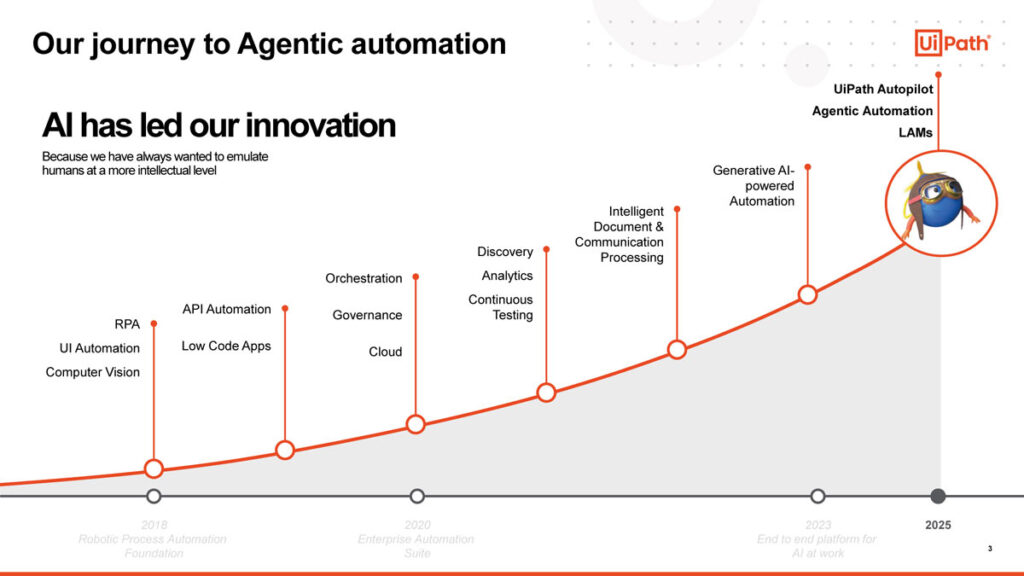
Key capabilities added include:
🔸 Computer Vision, enabling automation in restricted environments.
🔸 API Automation, made easy through integration services.
🔸 Web Interface Building to refresh legacy systems.
🔸 Orchestration Enhancements, allowing robots to reach out to humans for guidance (Human-in-the-loop).
🔸 Intelligent Document Processing (IDP), processing structured, semi-structured, and unstructured documents (like policies and contracts).
🔸 Discovery capabilities and analytics to observe processes and generate KPIs.
🔸 GenAI building blocks, providing the robot with a sense of “brains” to interact with different models securely.
This continuous innovation has led to the current platform, which UiPath views as the #1 end-to-end business automation platform.
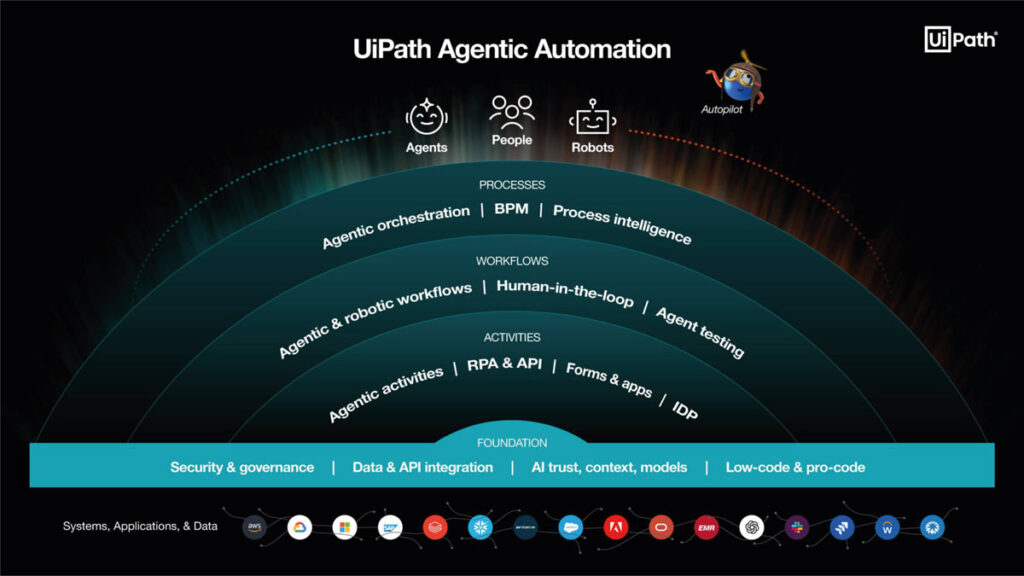
Act Two: here comes the era of Agentic Automation
Building upon the robust foundation of “Act One” – including security, governance, and integration – we enter the next era of agentic automation. This phase focuses on AI agents that can think and decide, working alongside traditional robots and humans.
Key components of this new era include the AI Trust Layer, context counting, and low-code building options. The agents and traditional RPAs use the same building blocks, acting like a “Swiss army knife” for automation.
The symbiosis of robots and AI Agents
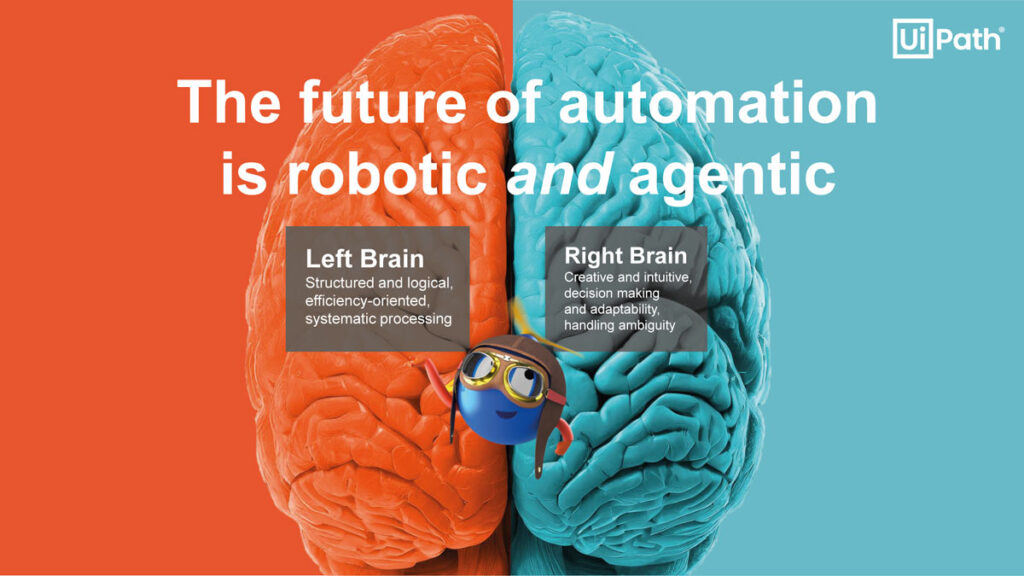
UiPath draws a parallel between the work division of robots and agents and the human brain:
- Robots are rule-based, deterministic, and logical, similar to the left brain. They excel at tasks requiring high reliability and efficiency.
- AI Agents are goal-based, undeterministic, and creative, similar to the right brain. They are best suited for tasks that are not well-defined and require high adaptability.
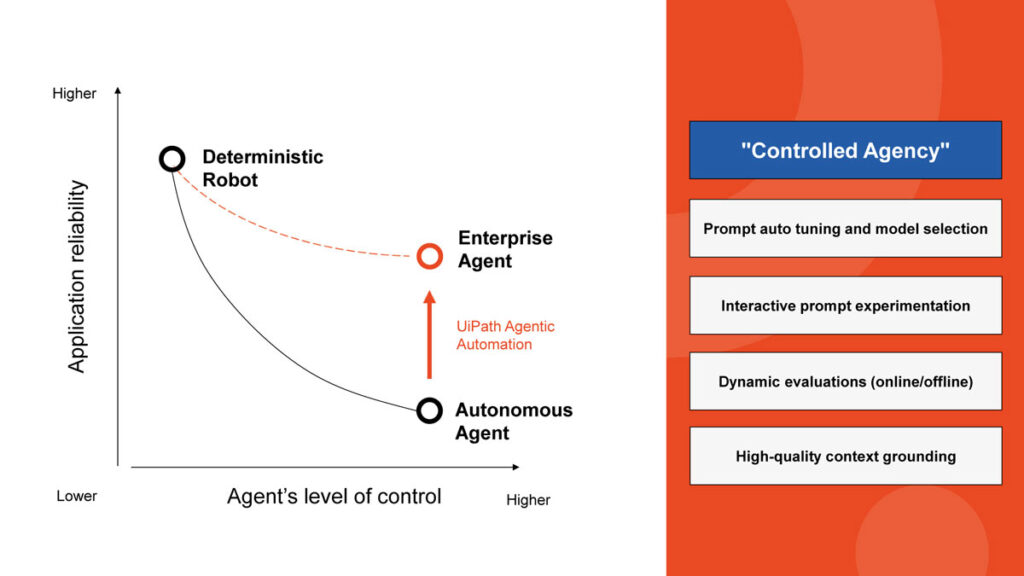
While agents have more control over how they reach a goal, they are inherently a bit less reliable than deterministic robots. UiPath closes this gap through controlled agency.
Ensuring trustworthy AI Agents through Controlled Agency
Controlled Agency is a collection of tactics designed to improve an agent’s trustworthiness:
- Prompt experimentation: an interacting prompt experimentation view allows developers to iterate the agent and see how it performs with different input arguments.
- Dynamic evaluations: collections of test cases generate a numerical value (0 to 100) that measures the agent’s quality, acting as a guiding light during iteration.
High-quality Context Grounding: this is UiPath’s term for Retrieval Augmented Generation (RAG), which brings large amounts of company-specific data to the agent in a controlled manner.
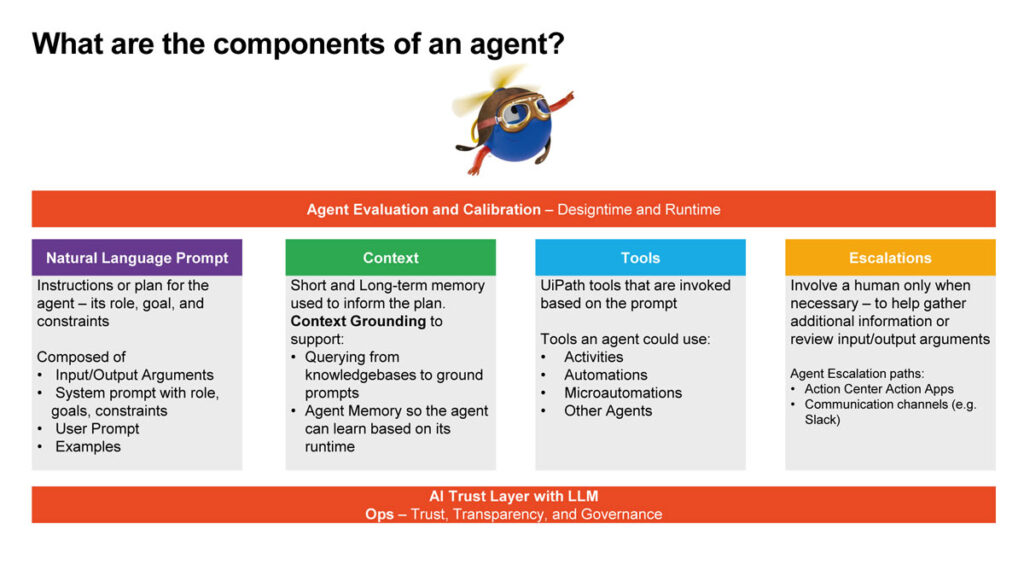
Building blocks of an AI Agent
An Agent is defined by several key components:
- Natural Language Prompt: this is essentially the Agent’s job description, defining the goal and how it should be reached.
- Context: company-specific knowledge, such as policies or product specifications, stored in context grounding databases. This knowledge allows the Agent to act as a helpful AI assistant.
- Tools: these enable the Agent to interact with different systems. Tools can be integration service activities, other automations (RPA flows), or even other agents. For instance, an Agent might call an RPA flow to read data from an application.
- Escalations: if an Agent encounters an abnormal situation or is unsure how to handle a decision, it can escalate to a human. These escalations appear as notes in the Action Center.
- Agent Memory: after a human resolves an escalation, the answer can be stored in the Agent’s memory for future use, allowing it to become more independent over time.
Regarding data privacy, the models currently used by UiPath Agents are hosted in the company’s private cloud, meaning data is not sent to external providers like OpenAI.
Furthermore, a “bring your own model” option is on the roadmap for organizations with strict confidentiality requirements.
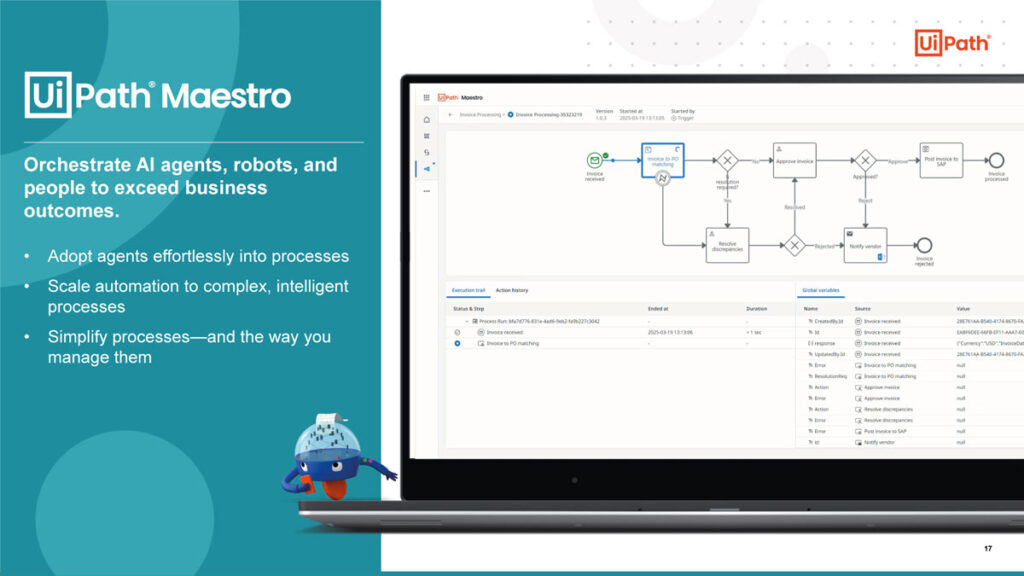
Orchestrating end-to-end processes with Maestro
Business processes are typically messy, rarely staying within a single system like Salesforce or SAP. They often involve multiple people handling data. UiPath is offering a savior, Maestro, for organizing these end-to-end activities done by humans, robots, and agents.
It presents a process-oriented, helicopter view, allowing organizations to orchestrate processes modeled in BPMN 2.0 notation.
Key functionalities of Maestro include:
- Implementation: linking process blocks with UiPath activities, including agentic tasks, traditional RPA executions, human-in-the-loop activities, and even agents developed on different platforms (like LangChain).
- Operation and Monitoring: providing visibility into individual process instances and using monitoring capabilities to find bottlenecks.
- Fault Tolerance: built-in retry mechanisms preserve work done during long-running processes (sometimes spanning several weeks).
- Optimization: utilizing process intelligence tools, such as process mining, to run “what if” scenarios for continuous improvement.
Maestro provides significant benefits across different personas:
- For automation and AI leaders, Maestro acts as a canvas to securely bring AI Agents from different silos (e.g., Salesforce or LangChain) and orchestrate activities among agents, automations, and humans.
- For process owners, it provides a single tool for every step of the lifecycle: model, implement, operate, monitor, and optimize.
- For IT leaders, it reduces the total cost of ownership (TCO) by acting as a single workflow management engine, supporting business rules and guardrails.
Practical demo: automating recruitment with Agentic Orchestration
As we believe, there is always a better way to show something in action, than to talk about it.
In one demo, we used UiPath’s Maestro to automate a recruitment process done entirely through email. The goal was to handle the tedious work of reviewing resume completeness, aggregating candidate applications, and answering basic questions based on internal policies.
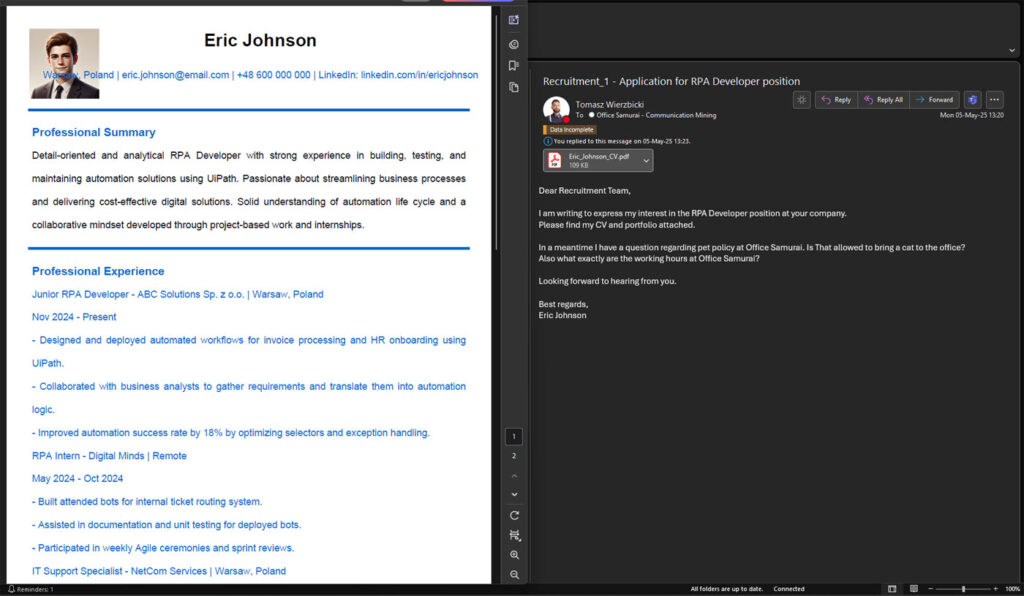
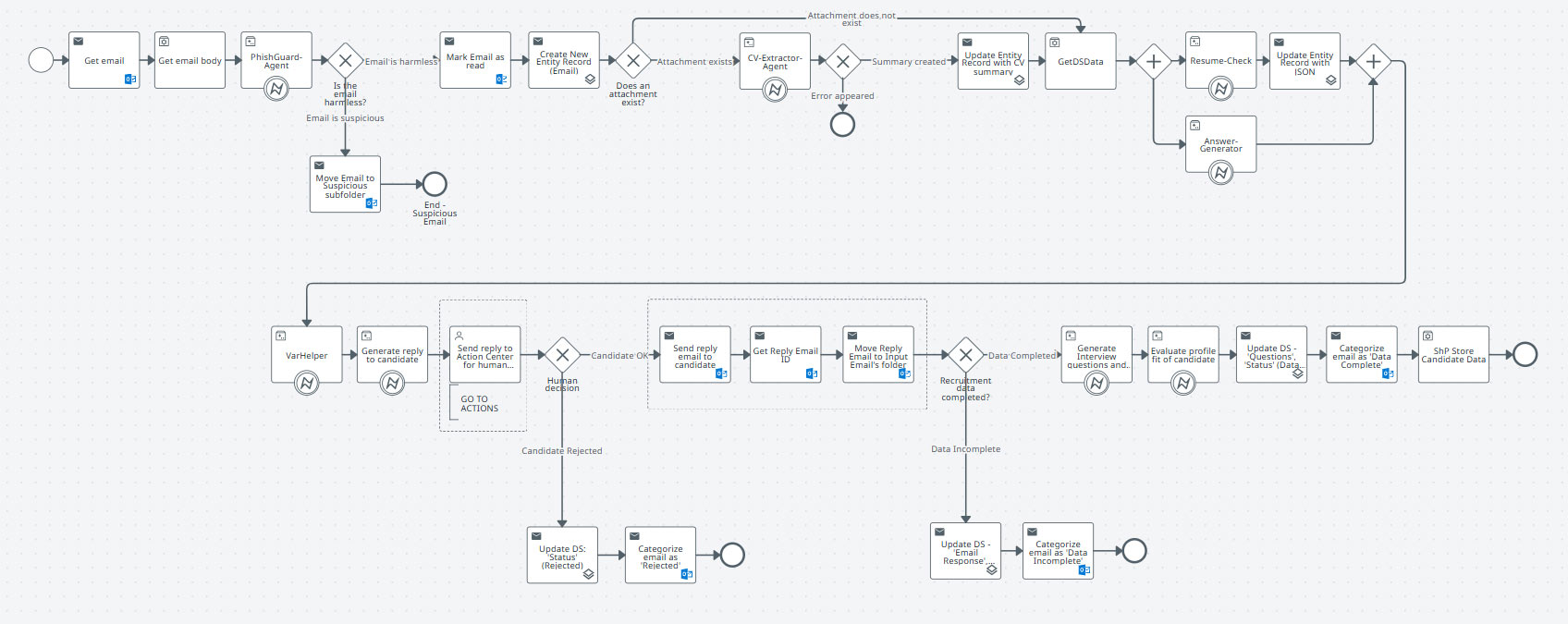
The process flow, combining eight agents, RPA flows, and human validation, included steps like:
- Initial screening Agent checks the incoming email for suspicious content.
- CV extractor Agent retrieves and summarizes data from the PDF attachment.
- Resume check Agent verifies if all required information (like language levels) is included.
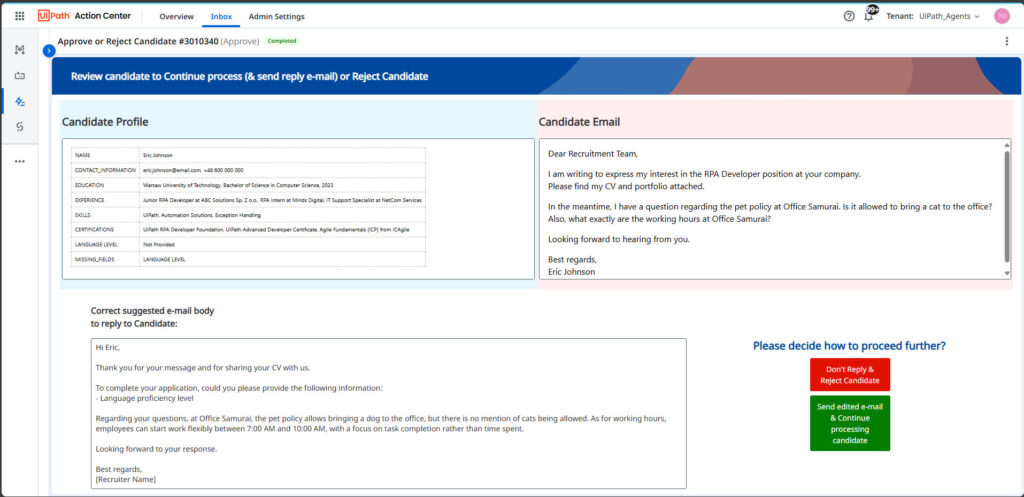
- Answer generator Agent checks for candidate questions (e.g., about bringing a dog to the office or working hours) and generates answers using company policies as context.
- Response assembly Agent combines the feedback and answers into a draft reply.
- A human validation step sends the draft email to the recruiter in the Action Center. The recruiter can review the structured details of the resume and modify the suggested email before accepting it.
- If data is incomplete, it is stored in the Data Service, and the email is categorized as such.
- Follow-up Agents can generate interview questions and evaluate profile fit to assist the recruiter.
- Pure RPA flows handle the final data storage on SharePoint.
This demonstrates how agents can deal with unstructured data (emails, policies) and tasks that require regulation interpretation, broadening the possibilities of automation beyond traditional rule-based flows.
Building a reliable agent, focused on simple tasks, can take about 1-2 hours, though thorough testing requires additional time to ensure quality across all scenarios.
Frequently Asked Questions (FAQ)
What did the webinar participants ask?
How well do AI agents handle complex documents like resumes with tables?
AI agents generally handle complex documents very well, including resumes containing tables and various formats. However, some edge cases–such as ratings represented by stars–may pose challenges. Continuous testing and refinement help improve accuracy in these scenarios.
Can the human-in-the-loop interface show original documents or links during validation?
Yes, UiPath applications and Action Center offer extensive customization to include links to original documents or attachments, allowing human reviewers to access all necessary information during validation.
Are data sent to external AI providers like OpenAI when using UiPath agents?
No, the current models used by UiPath agents are hosted in UiPath’s private cloud infrastructure, ensuring data privacy and security. Additionally, a “bring your own model” option is on the roadmap for organizations with strict confidentiality requirements.
How much does it cost to build and run an AI agent?
Pricing is consumption-based and depends on the complexity and usage of the agent. More complex agents with higher call volumes incur higher costs. For a precise estimate, it’s recommended to consult with UiPath or Office Samurai experts.
How long does it take to build a reliable AI agent?
Building a simple agent can take 1-2 hours, but thorough testing to ensure reliability may require more time. The best practice is to keep agents focused on specific tasks rather than attempting to automate an entire process within a single agent.
When should I use UiPath Maestro versus other AI orchestration tools like N10?
Maestro is ideal for enterprise-scale automation requiring robust security, reliability, and scalability. In contrast, tools like N10 may be more suitable for niche or custom solutions developed from scratch. Maestro integrates deeply with UiPath’s ecosystem, offering a comprehensive workflow management engine.
What does the “temperature” setting mean in agent testing?
Temperature controls the creativity or randomness of the AI model’s responses. A value of 0 means deterministic and precise outputs, while 1 allows more creative freedom. For most business automations, a low temperature is preferred to maintain consistency.
How does Maestro relate to UiPath Orchestrator?
Maestro serves as a process modeling and orchestration interface that integrates with UiPath Orchestrator. After designing processes in Maestro, you can deploy and trigger them through Orchestrator, benefiting from its scheduling, monitoring, and governance capabilities.
Don’t be afraid of Agentic AI revolution
Agentic AI and orchestration built via Maestro do not replace RPA – they empower it.
By combining RPA with AI, you gain a coworker that is “more intelligent” than ever before, smoothly involving human supervision when needed.
If you are struggling with communication, questions, tasks requiring document interpretation, or unstructured data, agents can be your personal assistant. UiPath’s Agent Builder and Maestro provide a powerful, integrated platform to automate complex, unstructured workflows securely and reliably at an enterprise scale.
The future of automation is taking shape; if you have processes crying out for an agentic intervention, Office Samurai is ready to assist in making it happen.